RosterOSfor personal trainersDownload

For personal trainers. Nothing else.

Run your book
like you run
your sessions.

RosterOS is the phone-first app built only for personal trainers. Clients, sessions, revenue, follow-ups in one place. Not a program builder, not a client app. Just the part that runs your book.

Free for 3 clients at launch. No spam, just the launch email.

  • Free for 3 clients
  • Works offline between sessions
  • Built for iPhone (iPad supported)
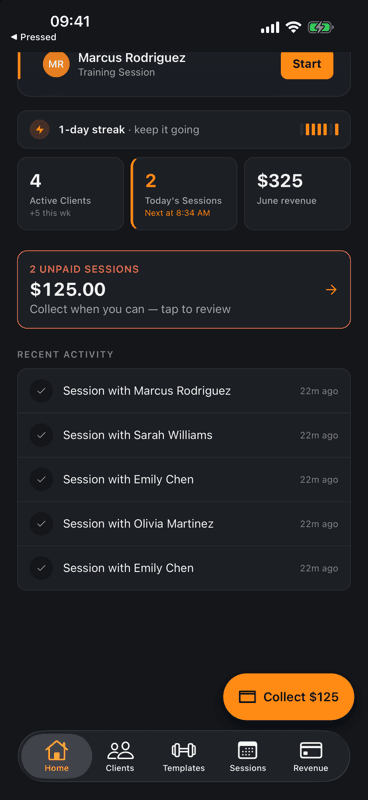
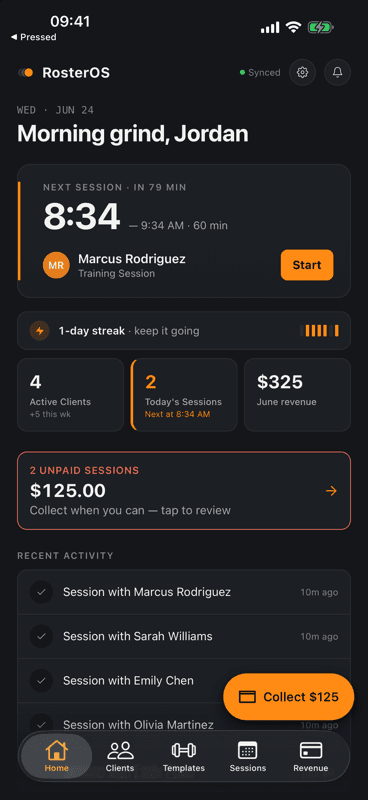
RosterOS Home screen showing today's sessions, active clients count, May revenue, and quick actions for Add Client, Book Session, Log Payment, and Quick Log.
Built for15–80 clients
ReplacesNotes + WhatsApp + Calendar + Venmo
Offline-firstOn the gym floor
Free tier3 clients · forever
00the mess

You already have a system.
It's spread across four apps.

Notes for goals and injuries. WhatsApp for reschedules and IOUs. A shared calendar for the schedule. Venmo for payments. A name in one place, a goal in another, a number you swear you'll remember. Something falls through. Usually it's revenue.

"Did Marcus pay for the last three? Let me check WhatsApp."

N
Notes app
Goals, injuries, session scribbles. Searchable, barely.
unstructured
W
WhatsApp
Reschedules, reminders, payment IOUs, scrolled away forever.
ephemeral
C
Calendar
Times, maybe a name. No context. No session notes.
thin
$
Venmo / cash
Who paid this month? Pull up three screens to find out.
manual
01features

Six things RosterOS does.
Each replaces a small mess.

RosterOS is the app you'd build for yourself if you had the time: clients, sessions, revenue, follow-ups, quick logging, and program templates. Not a workout app, a marketplace, or a client portal.

01

Clients with the context you keep in your head

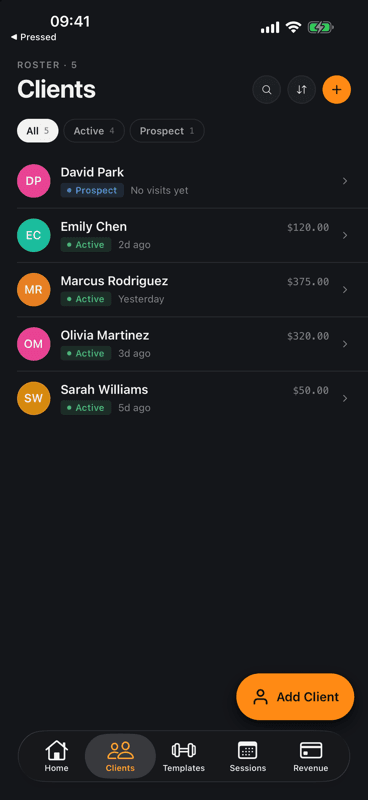
Goals, injuries, intake answers, preferred times, emergency contact, measurements, photos, payment history. One screen per person, not scattered across four apps.

  • Real client rows. Beginner, Intermediate, Advanced, Athlete, plus your own tags.
  • Intake on file. PAR-Q and waiver answers attached to the client, not lost in a chat.
  • Consistency at a glance. 30-day consistency, total sessions, lifetime revenue per client.
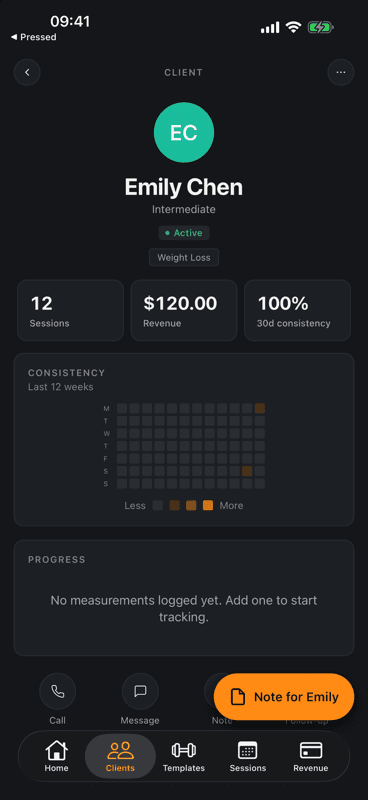
RosterOS Client Detail screen showing Emily Chen with sessions, revenue, 30-day consistency, tags, and quick action buttons for Call, Message, Note, Follow-up.
02

Your week, the way you book it

Schedule training, assessments, consultations, or online sessions in a few taps. Mirror them to your phone's calendar so reschedules stay in sync. No double-entry.

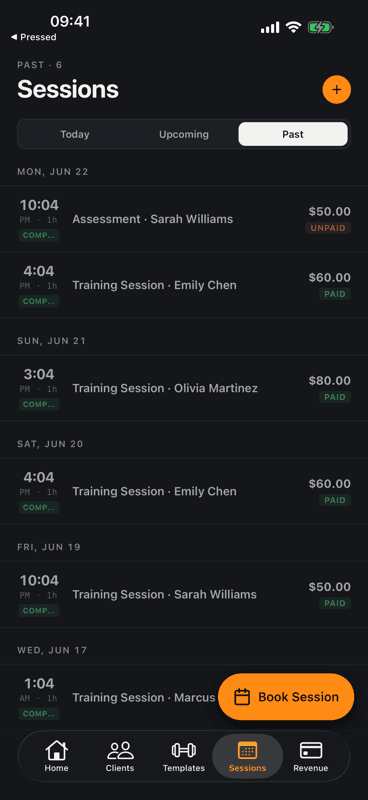
  • Today, Upcoming, Past. Three tabs. Nothing else to learn.
  • Calendar Sync. Optional one-way mirror into iOS Calendar so partners and other apps see your day too.
  • Repeats that match real life. Once, weekly × 4, × 8, × 12, × 26. Book a whole training block in one go.
RosterOS Sessions screen showing past training sessions grouped by date with client name, duration, and paid/unpaid status.
03

Revenue that doesn't fall through WhatsApp

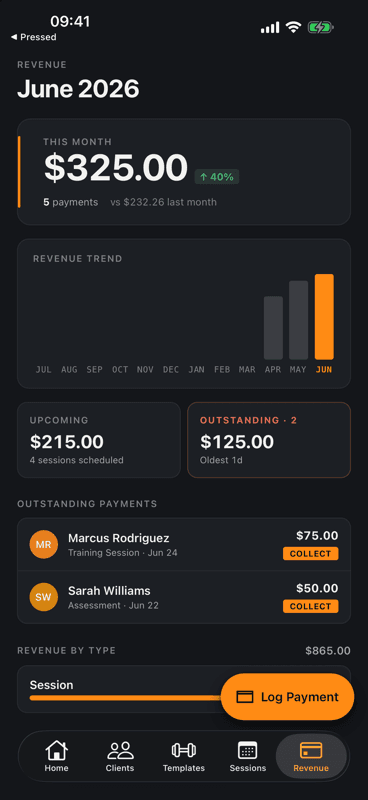
Every session is a paid or unpaid line. Outstanding balances surface on the dashboard. The 12-month trend shows whether this month beat last.

  • Outstanding, surfaced. Unpaid sessions and total owed visible the moment you open the app.
  • 12-month trend. Compare this month against last and against the year. No spreadsheet required.
  • One-tap collect. Open an unpaid session, log the payment, the dashboard updates.
RosterOS Revenue screen showing this month earnings, a 12-month revenue trend bar chart, and a list of outstanding payments from clients.
04

Quick Log opens the moment a session ends

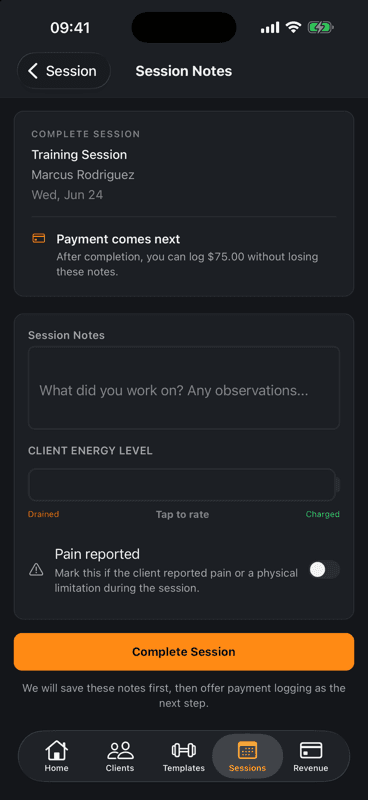
Mark a session complete and RosterOS opens the wrap-up for you: a quick note, the client's energy level, a pain flag, then logging the payment. No form to go hunt for.

  • Context-aware. Completing a session opens the wrap-up automatically. No form-picking.
  • Zero friction notes. Rate energy, flag pain, jot what you worked on. Under ten seconds, survives a full client day.
  • Payment comes next. Logs the session fee right after the notes, so unpaid sessions don't pile up.
RosterOS session wrap-up titled 'Session Notes' with a notes field, a Client Energy Level rating from Drained to Charged, a Pain reported toggle, and a Complete Session button.
05

Follow-ups that stop slipping

Notes, due reminders, and overdue alerts live with the client they belong to. The dashboard tells you which three people you owe a message today.

  • Due today on the dashboard. Three people, three messages, done before the first session.
  • Per-client history. Every follow-up timestamped with channel (Email, Text) on the client's record.
  • Suggested next steps. RosterOS flags clients who've missed 7+ days so re-engagement isn't a memory game.
RosterOS Home screen lower section showing Due Follow-ups for Olivia Martinez, Sarah Mitchell, and Michael Thompson, plus Recent Activity feed.
06

Workout templates, not a workout app

Save the program shapes you run every week (Full Body Circuit, Lower Body Power, Upper Body Strength) and assign them to a client without leaving RosterOS.

  • Strength, Hypertrophy, Endurance, Mobility. Filter by intent. Run programs you already trust.
  • Exercise-level edits. Adjust per-client. The template stays clean for everyone else.
  • No client app required. RosterOS isn't a fitness app for end-users. Programs live with the trainer.
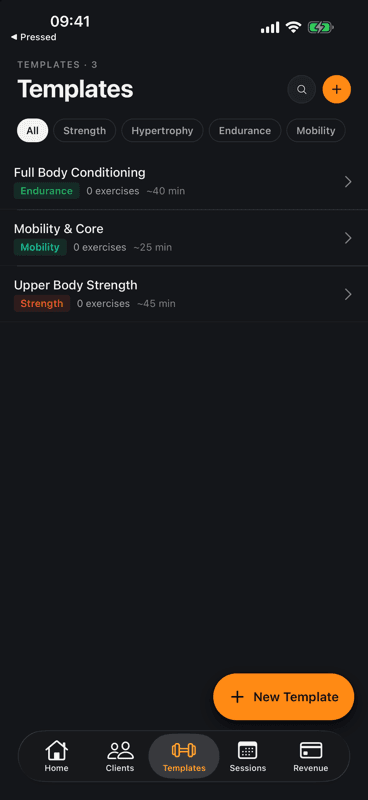
RosterOS Workouts screen listing 6 templates including Full Body Circuit, Lower Body Power, and Upper Body Strength, filterable by type.
02how it works

Install, import, book, log, get paid.

No bootcamp. No onboarding wizard that takes a week. RosterOS is set up to be useful by the end of your first coffee.

  1. step 01

    Install on iPhone

    Download RosterOS from the App Store. Sign in with Apple or create an account with email. RosterOS stores client data in your account, not in a public directory.

  2. step 02

    Bring your roster

    Tap Import from Contacts to pull existing clients in, or add them by hand with intake info, fitness level, goals, and injuries.

  3. step 03

    Book the week

    Schedule training sessions, assessments, or consults, single or recurring. Turn on Calendar Sync if you want them mirrored to iOS Calendar.

  4. step 04

    Log as you go

    Use Quick Log after each session to capture a note, payment, measurement, or progress photo. The dashboard, revenue, and client record update together.

  5. step 05

    Get paid, stay in touch

    Outstanding payments surface on the dashboard. Due follow-ups list the three people you owe a message today. Nothing falls through.

04pricing & trust

Free for the first three. Pro for the rest of the gym floor.

RosterOS is free forever for trainers managing up to three clients. Keep one client, three, or use it to try the full flow before you commit. Pro unlocks the whole roster.

Free

$0/forever

Try the full RosterOS flow with up to three clients.

  • Up to 3 active clients
  • Unlimited sessions for those clients
  • Quick Log: notes, payments, measurements
  • Follow-ups, intake forms, Calendar Sync
Start free

Pro · Monthly

$19.99/month

The whole roster, billed monthly via the App Store.

  • Everything in Free, plus:
  • Unlimited active clients
  • Workout Builder + assignable templates
  • Revenue Insights dashboard
  • Progress photos with before/after comparisons
Subscribe in app
Best value

Pro · Annual

$12/month, billed yearly

$149.99 billed yearly. The best value if RosterOS is part of your stack.

  • Everything in Pro · Monthly
  • ~37% off vs. monthly billing
  • 14-day free trial for new accounts
  • Auto-renews until cancelled
Subscribe in app

RosterOS Pro is sold through the Apple App Store. Subscriptions auto-renew unless cancelled at least 24 hours before the end of the current period. Manage subscriptions in Settings → Apple ID → Subscriptions. Prices shown are USD reference rates. App Store pricing is localised per region.

Trust, the boring kind.

Your data, in your account
Client records, sessions, notes, and payments live in your RosterOS account. They're not sold, rented, or shared with third parties for advertising.
Account required, by design
RosterOS syncs across your devices and survives a phone replacement. That requires a real account. Sign in with Apple is supported on iOS.
Subscriptions through Apple
RosterOS Pro is billed by the App Store. Manage, cancel, or restore from Settings → Apple ID → Subscriptions on your iPhone. Refunds are handled by Apple.
Delete on request
Delete your account from inside Settings. RosterOS removes your data from our servers within 30 days, per the Privacy Policy.
05common questions

The four most-asked. The rest live on the FAQ.

If your question isn't here, head to the full FAQ. If it isn't there, email support@rosteros.app and we'll answer.

Read the full FAQ

Ready to consolidate

One app.
One roster.
Zero scramble.

RosterOS launches on the App Store soon. Drop your email and we'll tell you the day it goes live. Free for your first three clients, no card to start.

Free for 3 clients at launch. No spam, just the launch email.

App Store · Coming SoonRead the docs